How to play Sixward
Place a stone
Select a stone in your tray, then tap an empty space beside a stone on the board.
Match color or symbol


Every stone touching an edge must match. Corners don’t count.
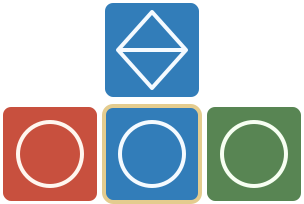
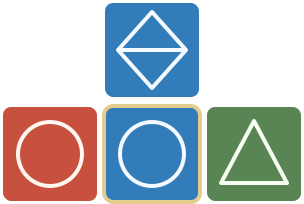
Plan the gaps
The full set has two of each ordinary color–symbol combination, including the starting stones. Later worlds may remove some.
If a gap needs a red diamond or green M and both copies of each are already on the board, place elsewhere.
Wildcards


A wildcard’s visible color or symbol must still match every touching neighbor. It also counts toward formations of that color or symbol.
Build your score
Connect more neighbors and match both traits for bigger Harmony rewards. For Perfect Harmony, fill every edge, include both color and symbol matches, and use no wildcards.
Complete multiple formations in one move for a 10% bonus. Perfect Harmony with a small formation earns 25%; with a major formation, 100%. Only the highest combination bonus applies.
Leaderboard eligibility needs an online start on a fresh board. Restarts and shared boards are practice; resuming an unfinished attempt keeps its eligibility.
Placement hints
Valid spaces light up after you select a stone. Highlights start on for your first 20 placements in each world; then choose whether to keep them. Change this in Play → Settings.
Open the next world
Reach the score target and place every stone in the same run. Pick a world in Play → Your Path.
Triangle and Square can be played privately as a guest. Beat Triangle to unlock Square. Hexagon and Circle require an account with a verified email, plus the previous world's completed goal.
A run ends when every stone is placed or none of your tray stones fit. There’s no time limit. Your game saves automatically.
Play privately by default, with stones drawn in your browser and local high scores saved on this browser. Tap the score to switch to a fresh ranked game; tap it again to leave ranked play and start a fresh private game. Switching modes always starts a new board. Private scores cannot become ranked scores.
Open My High Scores from a completed game's result screen to see one personal list containing private and ranked games. Private games never enter the public leaderboard. If you have an account, private history is saved to it; guest private history transfers automatically when you register or sign in.
All ranked games require a signed-in account with a verified email, in every world. Ranked games also need a connection. Each move is saved before the next stone is drawn; reconnect to continue after an interruption. Replayed boards stay unranked.
If your ranked game disconnects, reconnect within two minutes to resume its saved position. After that window, the run is vacated: the game is over and cannot submit a ranked score. Private games have no reconnect deadline. The pause button appears only during ranked games.
Shared boards, friend challenges, and replayed boards are always unranked because the bag sequence may already be known. Challenge results stay within that challenge and do not enter the global ranked leaderboard.
Optional tutorials
Practice the matching rules or learn stronger scoring moves whenever you want. Your game waits while you practice.
Choose a tutorial →Find your way
Play: new games, settings, and your path.
Score: switch between private and ranked play by starting a new board.
Account: login, avatar, and profile.